



It’s been a while since my last post here, August 2022 to be exact! A lot has changed since then, not least that just about every conversation I have with customers now includes the letters A and I (or, as some people are now calling it, SI for Super Intelligence :)). So it felt like the right topic to dust off the keyboard for.
Every organisation I talk to has an AI strategy. Very few of them have an AI strategy that starts with where their most valuable data actually lives. It doesn’t live in a chat window. It lives in Oracle, SQL Server, PostgreSQL and SAP, on the business critical systems that run payroll, trading, claims, logistics and patient records. In many cases those are the same systems we spent the last 15 years virtualizing, consolidating and protecting. Yet the first instinct of many AI projects is to extract that data, copy it, and ship it off somewhere else so a model can look at it. Data gravity says that is the hard way, the expensive way, and from a security standpoint often the wrong way. This article covers how to bring the AI to the data instead. It covers a reference architecture, a practical RAG data flow, where vectors should live, GPU placement and sizing, and the governance you need now that AI agents are becoming database users, all on Nutanix.
Disclosure: I work for Nutanix as a Principal Solutions Architect. This is my personal blog, and the opinions expressed here are my own and not necessarily those of my employer.
Data Gravity Hasn’t Gone Away, AI Has Made It Stronger
Business critical databases have always been heavy. Big, busy, latency sensitive, heavily licensed and wrapped in compliance controls. A 100TB Oracle RAC database doesn’t move anywhere quickly, which is exactly why I was so excited when we could refresh one into 10 non-production copies in about 20 minutes without consuming extra capacity. AI doesn’t change the physics. It makes the gravity stronger, because retrieval augmented generation (RAG) and agentic applications want fresh, governed access to that data, repeatedly, at query time.
There are three reasons I believe the default should be bringing AI to the data:
- Security and sovereignty. Every additional copy of production data is another thing to secure, audit, mask and explain to the regulator. If inference, embeddings and vector search run inside your own security boundary, your sensitive rows and documents never need to leave it.
- Freshness and consistency. A RAG answer is only as good as what was retrieved. Nightly extracts to a remote store are stale the moment they land. Retrieval close to the source can be near real time and can apply the same row-level security the application uses.
- Cost and licensing. Egress charges, duplicated storage and, most importantly for Oracle and SQL Server, licensed cores. Bolting GPU servers or new hosts into a licensed database cluster without thinking can turn into a very expensive surprise. More on that below.
Interestingly the database vendors agree. Oracle positions Oracle AI Database 26ai as the place to “use AI on that data without moving it”, with AI Vector Search included at no additional charge. SQL Server 2025 has a native VECTOR data type, and PostgreSQL has pgvector. The vectors are coming to the database whether you like it or not. The platform underneath needs to be ready for it.
A Reference Architecture for Databases and AI on Nutanix
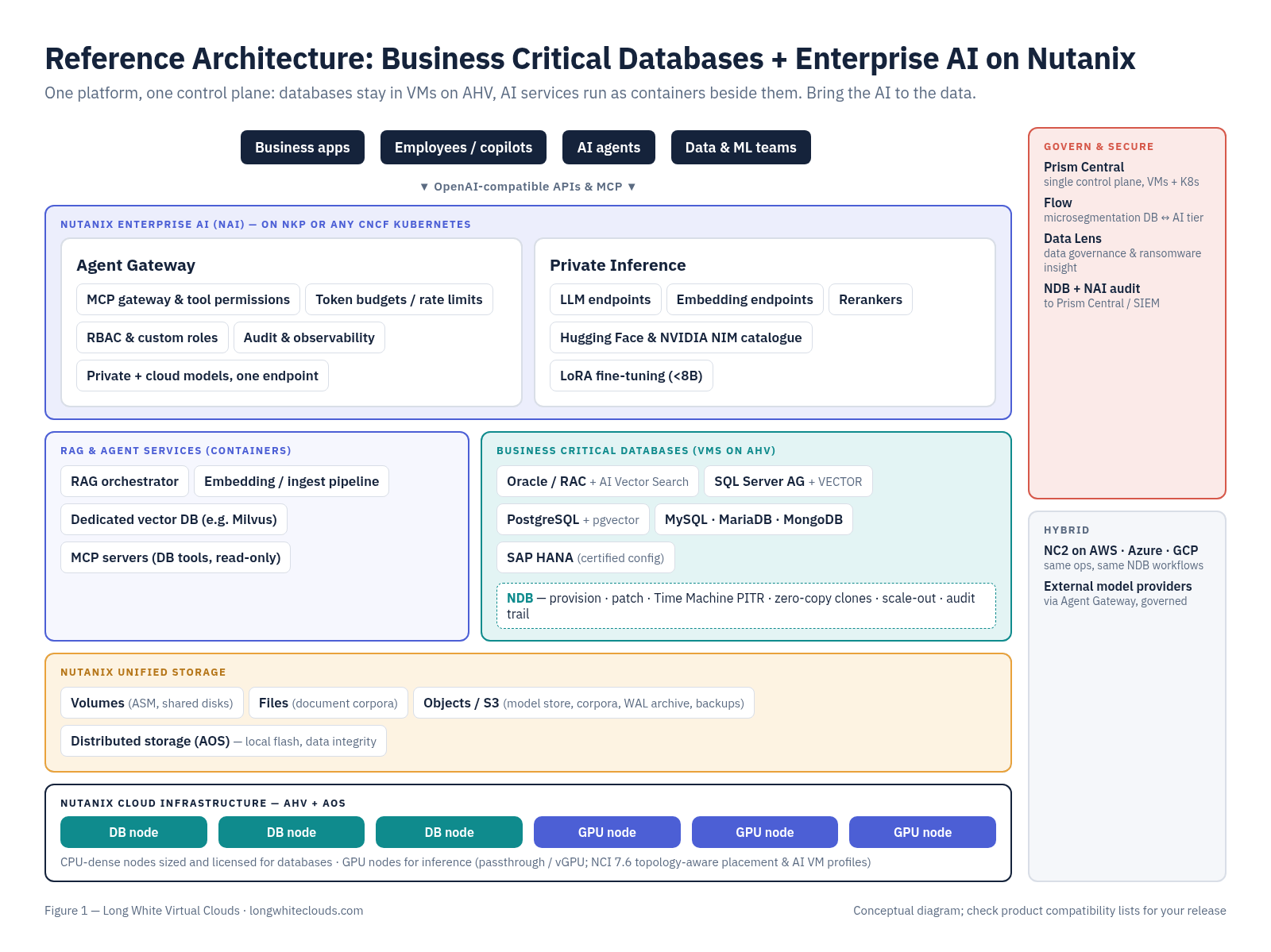
The good news is that you don’t need a separate AI silo. Nutanix has been describing this as a dual-native architecture, with VMs and containers as first-class citizens side by side on the same platform, management plane and security policies. For business critical apps that matters a lot. Your Oracle RAC, SQL Server Always On AGs and SAP HANA stay in VMs on AHV, where they are supported, tuned and protected. The AI services (inference endpoints, RAG orchestrators, vector databases, MCP servers) run as containers on Kubernetes right next to them. The following diagram shows how the pieces fit together.
Working from the bottom up:
- Nutanix Cloud Infrastructure (AHV + AOS) provides the compute and distributed storage for both the database VMs and the Kubernetes worker VMs, with CPU-dense nodes for databases and GPU nodes for inference. With NCI 7.6 and AHV 11.2, Nutanix added topology-aware scheduling, NUMA/PCIe-aware GPU and NIC placement, and predefined AI VM profiles. Their NCCL testing on supported NVIDIA HGX systems showed more than 99% of bare metal bandwidth for GPUDirect RDMA and NVSwitch all-reduce tests. Note this was initially released for specific hardware configurations, so check the compatibility list for your platform.
- Nutanix Unified Storage provides Volumes for in-guest iSCSI (think Oracle ASM and shared disks for clusters), Files for document repositories, and Objects as S3-compatible storage for model artefacts, document corpora, backups and PostgreSQL WAL archives. NUS 5.3 added multitenant object quotas and more Smart Tiering targets, and Nutanix has announced RDMA acceleration for S3 later in 2026.
- Nutanix Database Service (NDB) manages the database fleet: Oracle, SQL Server, PostgreSQL (including pgvector), EDB Postgres, MySQL, MariaDB and MongoDB. It handles provisioning, patching, Time Machine based point-in-time recovery, and the zero-copy clones that become very important for AI pipelines.
- Nutanix Kubernetes Platform (NKP), or any CNCF-conformant Kubernetes, hosts the AI services.
- Nutanix Enterprise AI (NAI) is what started life inside GPT-in-a-Box 2.0. It has grown into two main pieces. Private Inference serves LLM, embedding and reranking endpoints from a validated catalogue of Hugging Face models and NVIDIA NIM microservices. Agent Gateway acts as the governed front door for applications and agents, including MCP tool access, token budgets, RBAC and audit.
- Prism Central, Flow and Data Lens provide a single control plane, microsegmentation and data governance across all of it.
The important point is that the AI tier and the database tier share the same platform, the same operations and the same network security model, but they don’t have to share the same hosts. I’ll come back to why that matters when we talk about licensing.
RAG Over Enterprise Data, Without Hammering Production
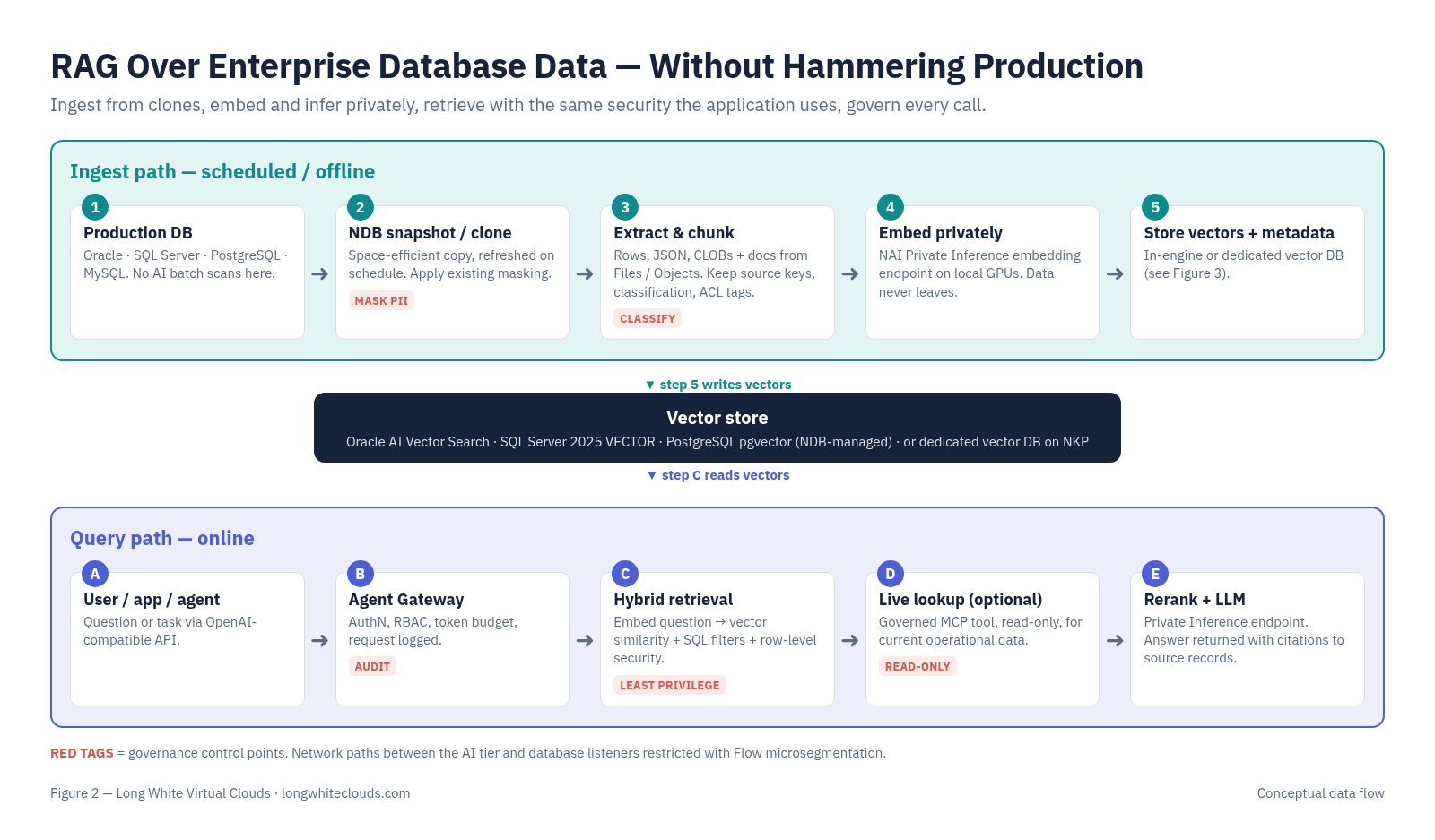
Here is where the copy data management capabilities that I have been banging on about for years really earn their keep. The worst thing you can do is point an embedding pipeline that scans millions of rows directly at a production OLTP database during business hours. The following diagram shows a pattern that keeps production safe while still giving the AI fresh data.
The ingest path (offline / scheduled)
- Clone, don’t scan. Use an NDB snapshot or clone of the production database as the source for embedding jobs. The clone is space efficient and quick to refresh, and the pipeline’s heavy reads land on a copy rather than on production. Apply your existing data masking process as part of the clone refresh workflow so PII never reaches the embedding model unless it is supposed to.
- Extract and chunk. Pull the relevant rows, JSON, CLOBs and documents (from Files or Objects), chunk them sensibly, and carry the metadata with them: source table, primary key, business unit, classification and ACL tags. You will need that metadata later for filtering and access control.
- Embed privately. Call an embedding endpoint on NAI Private Inference, so the text being embedded never leaves your environment.
- Store the vectors with the metadata, either in the database engine itself or in a dedicated vector database (see the next section).
The query path (online)
- A user, application or agent calls the Agent Gateway, which authenticates the caller, applies RBAC and token budgets, and records the request.
- The RAG orchestrator embeds the question and performs a hybrid retrieval: vector similarity plus ordinary SQL predicates and the same row-level security rules the business application uses.
- Where an agent needs live operational data (“what is the current status of order 12345?”), it calls a governed MCP tool, which Agent Gateway can restrict to read-only, rather than holding database credentials of its own.
- Results are reranked, sent to an LLM endpoint on Private Inference, and the answer comes back with citations to the source records. Every step is logged.
None of this is exotic. It is the same discipline we have always applied to business critical data (least privilege, separation of production and non-production, auditability) extended to a new type of consumer.
Where Should the Vectors Live – In the Database or Beside It?
This is the question I get asked the most, and of course the answer is “it depends”. It depends on a small number of things you can actually reason about. The following graphic summarises how I think about it.
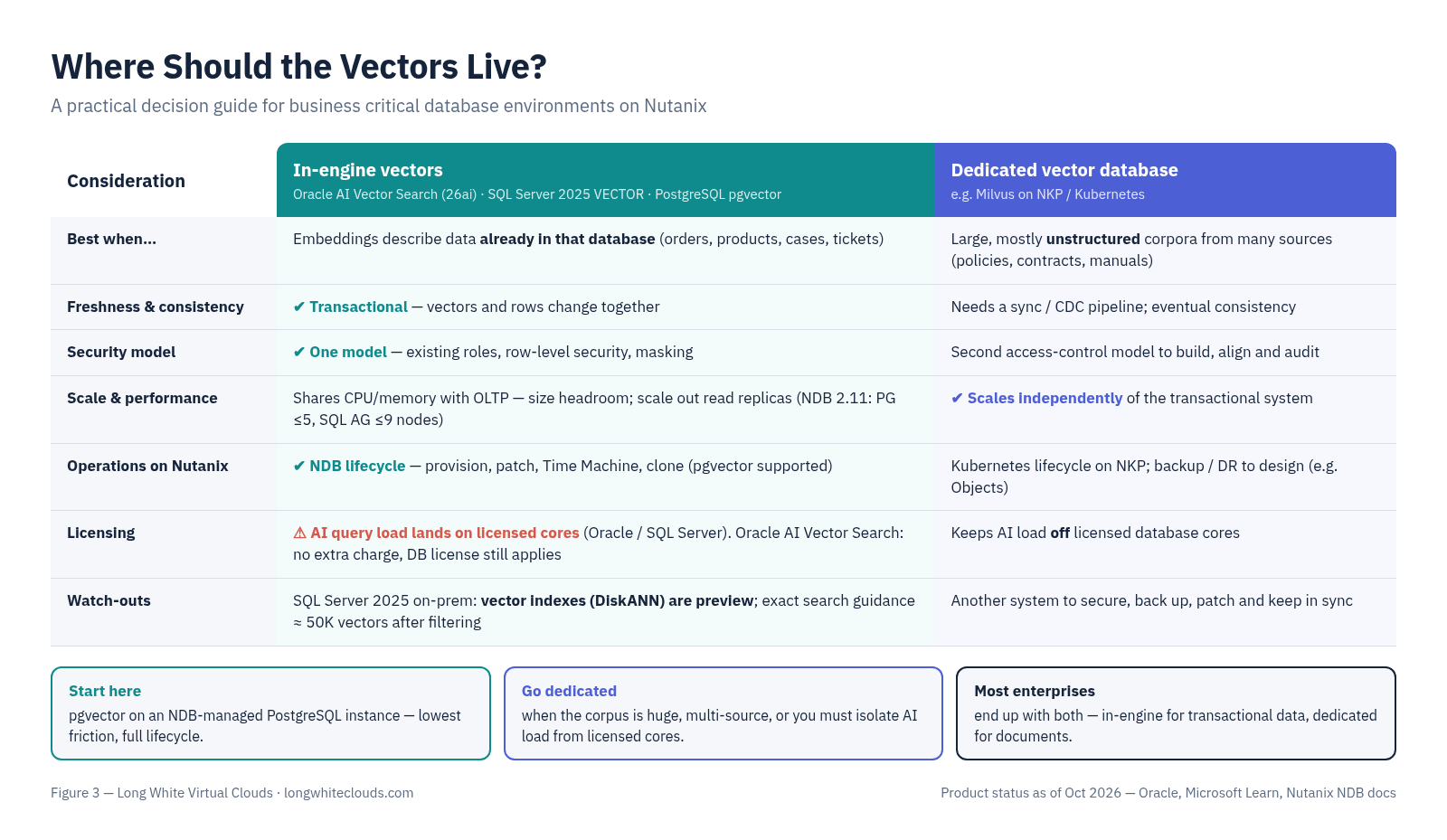
In-engine vectors (Oracle AI Vector Search, SQL Server 2025 VECTOR, PostgreSQL pgvector) are compelling when the embeddings describe data that already lives in that database. You get transactional consistency, one backup and DR story, one security model (including row-level security and masking), and your DBAs already know how to run it. Some product details to be aware of as of today:
- Oracle AI Database 26ai is a long-term support release that replaces 23ai via a release update, with AI Vector Search included at no additional charge. You still need to be licensed for the database itself, of course!
- SQL Server 2025: the VECTOR data type and vector functions are generally available. However, vector indexes (DiskANN) and approximate search are still preview features in SQL Server 2025 on-premises, even though they are GA in Azure SQL. Microsoft’s own guidance is that exact search is fine up to roughly 50,000 vectors after filtering. Plan accordingly before you promise a production ANN workload on-premises.
- PostgreSQL with pgvector is fully supported by NDB, so you get the same provisioning, HA, patching, Time Machine and cloning workflows as any other Postgres database. NDB 2.11 added the ability to add or remove PostgreSQL cluster nodes (up to 5) and SQL Server AG nodes (up to 9) with near-zero downtime, plus native PostgreSQL DR with WAL archival to Nutanix Objects. Handy when your vector read traffic grows faster than expected.
A dedicated vector database (Milvus, for example, which Nutanix has said will be in the NKP AI Applications Catalog) makes sense when the corpus is large and mostly unstructured, when it combines many sources, when it needs to scale independently of the transactional system, or when you simply don’t want AI query load anywhere near a licensed Oracle or SQL Server core. The trade-off is another system to secure, back up and keep in sync, and your access control model now lives in two places.
In practice many customers will end up with both. In-engine vectors for “semantic search over my orders and products”, and a dedicated store for “search all of our policies, contracts and manuals”.
Sizing and Placement – GPUs Are the New Oracle License
I’ve written a lot over the years about licensing databases in virtualized environments, and about the people who try to scare you with FUD about it. The same principles apply here, with a twist. GPU servers are expensive, scarce and often more powerful in CPU cores than you need, and if you add them to a cluster where Oracle or SQL Server is licensed by physical core, you may have just expanded your licensing footprint. This isn’t licensing advice, so always validate your position against your own contracts and with your licensing advisor. The following graphic shows the three placement patterns I see most often.
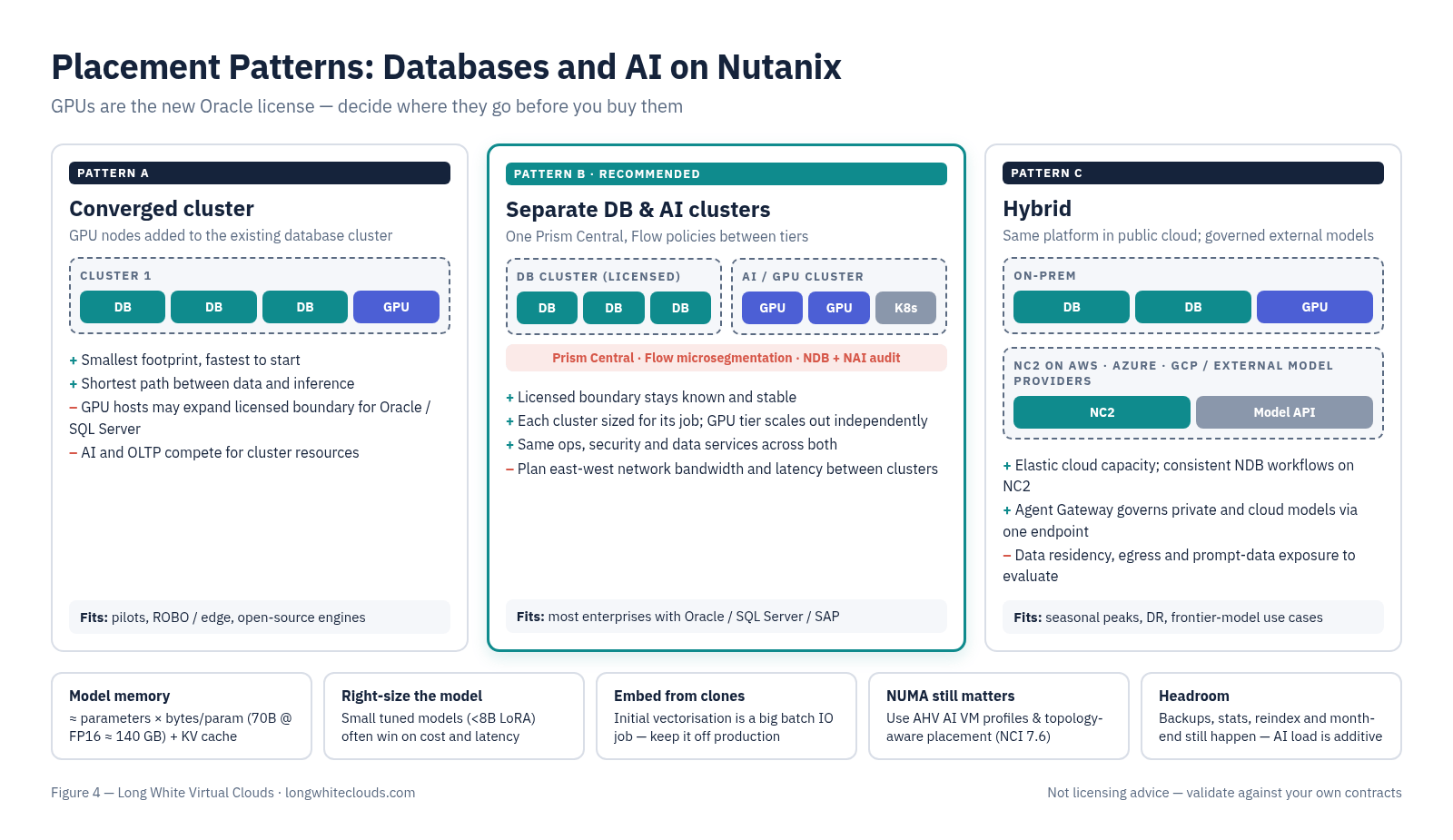
For most enterprises with licensed database engines, Pattern B (separate database and AI/GPU clusters managed by one Prism Central, with Flow policies between them) is the sweet spot. Each cluster is sized for its job. The database cluster stays a known, licensed boundary, and the GPU cluster can scale out as AI demand grows. Pattern A is great for a pilot or a smaller site running open source engines. Pattern C extends the same model to NC2 on public cloud and to external model providers through the gateway, while the data stays where it is.
Some sizing considerations that are easy to miss:
- Model memory comes first. As a first-order estimate, model weights need roughly parameters × bytes per parameter. A 70B parameter model at FP16/BF16 is about 140GB before you add KV cache for concurrent sessions and long contexts. That is simple arithmetic, not a benchmark, and quantisation changes it significantly. NAI 2.8 adds multi-node, multi-GPU inference and KV cache offload to CPU memory as tech preview features, which Nutanix explicitly says are not for production yet.
- Not every task needs a frontier model. NAI 2.8 supports LoRA fine-tuning of models under 8B parameters on a single GPU, and Nutanix quotes speculative decoding at up to 2.5x faster token generation. A small, tuned model next to your data may beat a huge general model on cost, latency and accuracy for a narrow business task.
- Embedding and indexing hit the database, not just the GPU. Initial vectorisation of a large table or corpus is a big batch job with real IO. Run it against a clone, schedule it, and size the vector index memory: approximate indexes like HNSW are often memory hungry, while DiskANN is designed to work from SSD. This is exactly the sort of random read workload where low latency local flash on Nutanix nodes shines.
- NUMA still matters. Everything I wrote about right-sizing vCPUs to NUMA nodes for HammerDB applies to vector search and inference VMs too. With NCI 7.6, AHV now places GPU, NIC and memory with topology awareness, so use the AI VM profiles rather than hand-crafting it.
- Leave headroom for the day job. Backups, stats, reindex and month-end still happen. AI query load is additive.
Published benchmarks only tell you so much. The best way to know how vector search, embedding pipelines and inference endpoints will behave alongside your databases is to test them with your own data, your own prompts and your own concurrency, under realistic conditions. Measure the impact on your OLTP baseline while an embedding refresh runs, too. HammerDB and SLOB are still great tools for that, and comparing a refresh from a clone against one run directly on production will quickly show why the clone approach matters.
Security and Governance – AI Agents Are Your Newest Database Users
An AI agent with a database connection string is the new service account with sysadmin rights that nobody remembers creating. It’s an audit finding waiting to happen. Agentic AI makes this more acute, because a single request can fan out into multiple tool calls across multiple systems. Some controls I’d put in place from day one:
- No direct credentials in agents. Route tool access through Nutanix Agent Gateway’s MCP gateway, now generally available in NAI 2.8, with per-user or per-API-key permissions such as read-only versus write, and an audit trail of every MCP request.
- Least privilege in the database too. Dedicated read-only roles, row-level security, masking or redaction, and views designed for AI consumption. Oracle 26ai, for example, describes end-user-specific row, column and cell-level visibility and dynamic masking for exactly this reason.
- Audit the platform operations as well as the queries. NDB 2.11 added a structured audit trail of every console, API and CLI action, forwarded to Prism Central and on to your SIEM via syslog. It also routes database VMs’ Prism API calls through the NDB control plane, so database VMs no longer need direct access to Prism on port 9440. That is a nice reduction in attack surface.
- Segment the AI tier. Use Flow microsegmentation so inference and agent workloads can only reach the specific database listeners and MCP servers they need. Nutanix is positioning NKP on AHV with Flow (in the upcoming NKP 2.19) specifically for network-level sandboxing of AI agents.
- Watch the tokens. Token budgets and rate limits in Agent Gateway aren’t just about cost. A sudden spike is a very good early indicator that an agent is misbehaving.
- Air-gapped when you need it. NAI 2.8 can import NVIDIA NIM models from NFS or S3-compatible storage for air-gapped deployments, which matters for defence, government and some financial services customers.
What About SAP and Other Business Critical Apps?
SAP HANA on AHV has been validated for production since 2018 under SAP Note 2686722, on certified OEM hardware configurations. My advice is simple: keep HANA on its certified configuration and don’t drop GPUs or AI containers onto those hosts. Bring AI to SAP data through supported interfaces and APIs, governed by the same gateway and MCP controls described above, or through replicated or cloned copies for analytical RAG use cases. The same goes for any packaged application with a strict support matrix. The AI tier sits beside it, not inside it.
Getting Started
If you already run your databases on Nutanix, you are closer than you think:
- Pick one high-value, low-risk use case. Internal knowledge search over policies plus a read-only view of reference data is a classic.
- Get the data hygiene right. Classify the data, decide what the model may see, and set up masked NDB clones as the AI source.
- Stand up NAI on NKP, on a small GPU cluster managed by your existing Prism Central (Pattern B), with one embedding model and one small LLM.
- Choose your vector store using the decision guide above. pgvector on an NDB-managed Postgres instance is the easiest place to start.
- Put Agent Gateway in front from day one, with RBAC, token budgets and audit. Retrofitting governance is always harder.
- Measure, both the AI metrics (latency, tokens/sec, retrieval quality) and the impact on your databases, then scale out.
Recommended Reading
- Charting the Path to Governed Agentic AI with Nutanix Enterprise AI 2.8 – Nutanix blog
- Announcing Nutanix Database Service 2.11 – Nutanix blog
- NCI 7.6: Combining Nutanix Simplicity with Near Bare Metal AI Performance – Nutanix Tech Center
- Vector Search & Vector Index in SQL Server – Microsoft Learn
- Oracle AI Vector Search User’s Guide (26ai) – Oracle Docs
- pgvector – GitHub
- Refreshed 100TB Production Oracle DB to 10 x Non-Prod DB’s in 20 Mins! – this blog
Final Word
AI doesn’t replace your business critical databases. It makes them more valuable than ever, because they hold the data that makes an AI answer worth trusting. The organisations that win won’t be the ones that copy the most data into someone else’s cloud. They will be the ones that bring inference, vectors and agents to the data, safely, with the same discipline they already apply to production. With NDB looking after the database fleet, Nutanix Enterprise AI providing governed private inference and agent access, and GPUs running alongside your databases rather than tangled up in your licensed clusters, you can do exactly that on the platform you already know. If you could put AI to work on your most valuable data next quarter without moving it, what would you build first? Take NDB for a Test Drive, and I’d love to hear your feedback and comments.
This post first appeared on the Long White Virtual Clouds blog at longwhiteclouds.com. By Michael Webster. Copyright © 2012 – 2026 – IT Solutions 2000 Ltd and Michael Webster. All rights reserved. Not to be reproduced for commercial purposes without written permission.